ACTIVE ON YOUR ESTATE

Welcome to your security platform.

This is what’s quietly protecting your business, day and night. Twelve security disciplines. One lightweight agent. Everything explained in plain English below.

12+
Active disciplines
24/7
Always running
0
User actions needed
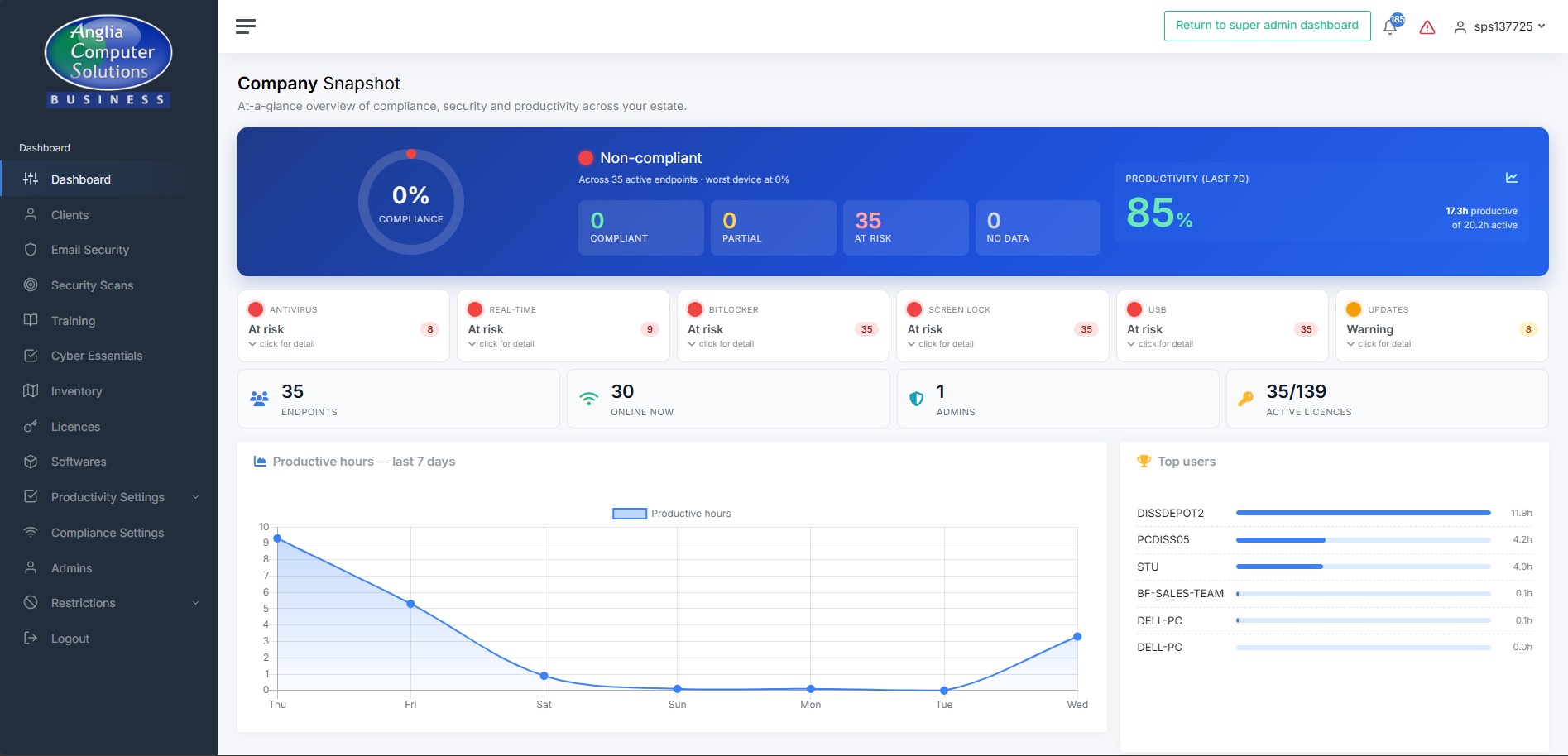
Company snapshot dashboard
What’s included

What SSM does for you, every day

You’re paying for 12 different security disciplines. Here’s a quick taste of the six your team interacts with most — visit the features tour for the full list.

Protects your devices

Every Windows PC in your business is being kept compliant — BitLocker on, USB drives blocked, screen-lock enforced. If someone changes a setting, it gets put back on next boot.

Watches your systems

Your Microsoft 365, your devices, your credentials. We spot problems before they become breaches — risky OAuth grants, leaked passwords, stuck updates, unusual sign-ins.

Fixes problems automatically

Stuck Windows Updates, stale antivirus signatures, mailboxes forwarding externally — we remediate in the background. You only hear from us when something genuinely needs your attention.

A quick tour

Six things SSM is doing right now

Click any tile to read the full explanation of what that feature is and how it benefits your business.

See all 12 features explained
24/7
Running in background
~60 MB
RAM per endpoint
0
Passwords stored
UK
Hosted & supported
Behind the scenes

What a normal day looks like for your SSM

You don’t need to do anything. Here’s what the platform is doing while you get on with running your business.

Every day, without you needing to do a thing

  • Every endpoint checks in over an encrypted connection, reports its status
  • Compliance policies are re-asserted if anything has been tampered with
  • Windows Updates and antivirus signatures checked — remediated if stuck
  • Your Microsoft 365 tenant is scanned for new risks
  • Productivity and activity data quietly captured for your reporting
  • Screenshots taken during business hours (stored securely on your tenant)
  • Cyber Essentials evidence refreshed automatically from live data
  • If anything genuinely urgent happens, you or ACS support gets an alert
Common questions

Things customers often ask us

Where do I access the dashboard?
Head to ssm.angliacomputersolutions.co.uk and log in with the credentials we set up for you. If you need a password reset or another admin added, drop us a line via the support page.
Do my staff need to do anything?
No. The agent runs silently in the background. They might occasionally see a screen-lock prompt or a blocked USB notification — but those are security features, not disruptions. No training needed.
Will SSM slow our computers down?
No. The agent uses around 60 MB of RAM and sits idle most of the time. Because it replaces the need for multiple separate security tools, it’s usually lighter than what you were running before.
Do you ever see our users’ passwords?
Never. We read only the metadata browsers already expose (breach flags, credential-insecurity counts). Phishing simulations never keep submitted credentials — we record a boolean “they submitted” only.
Where is my company’s data stored?
All data sits on UK servers managed by Anglia Computer Solutions. TLS 1.2+ in transit, encrypted at rest. Full privacy detail on the Privacy page.
How do I add a new machine?
Run your company’s installer on the new machine — it auto-registers on first boot and is protected within minutes. If you need a fresh installer file, contact support.
What if my machine is flagged red on the dashboard?
Click the machine in the dashboard to see the breakdown. Most issues (missing patches, stale AV) are auto-remediated. Persistent reds get escalated to ACS support automatically.
Can I have more admin accounts?
Yes — contact support and we’ll provision additional admins under your company tenant. They’ll see only your data, never other customers’.
Ready to explore your dashboard?

Everything you’ve read about is waiting for you. If anything’s unclear, the support team is one click away.